
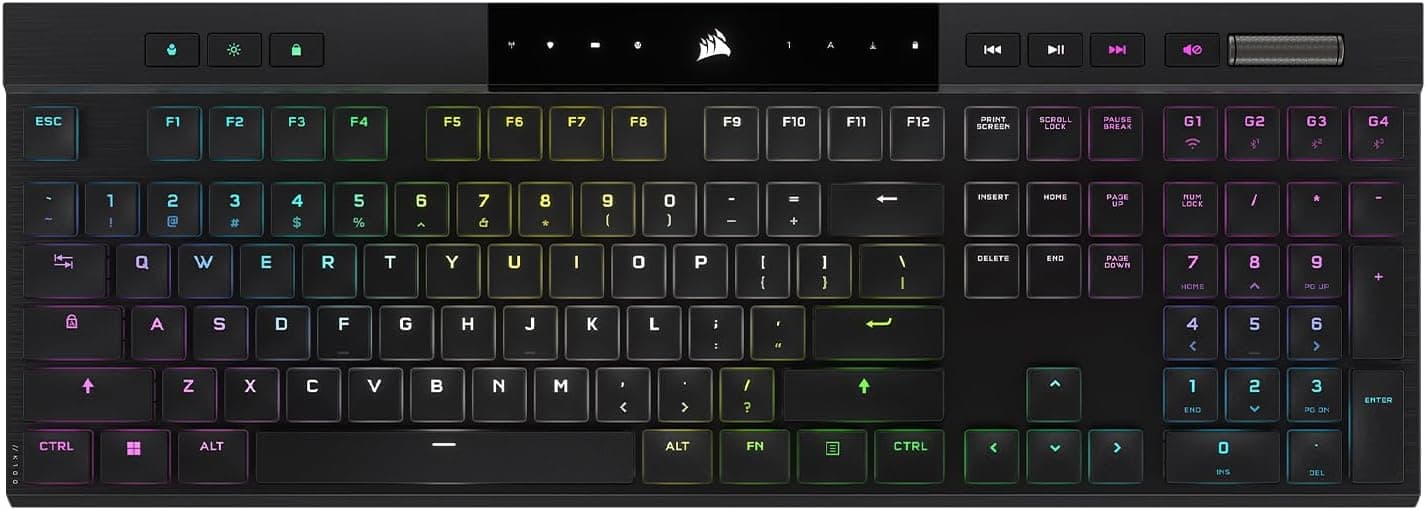
Best Amazon Wireless Mechanical Gaming Keyboard Deals for PC and Console Gamers in 2026
Introduction
Let's be brutally honest for a second. If you are still gaming on a mushy, tethered membrane keyboard in 2026, you are actively handicapping yourself. I see so many players drop thousands of dollars on a top tier graphics card, only to control their games with a piece of plastic that belongs in a 2005 cubicle. It makes zero sense.
The gear you actually touch matters. Your keyboard is the direct link between your brain and the game. Today, gamers demand absolute precision. We want zero latency. We want wireless freedom that does not die after two days. Most importantly, we want our setups to look incredibly clean and sound absolutely fantastic.
Trying to buy a keyboard right now is a total nightmare though. The market is absolutely flooded with marketing jargon, fake reviews, and overpriced junk. That is exactly why I put together this guide. I want to cut through the garbage and show you the actual best wireless mechanical gaming keyboards worth your hard earned money. We will talk about the magic of Hall Effect magnetic switches, the absolute necessity of good acoustics, and exactly what works for PC versus consoles.
If you are finally ready to ditch the cables and feel what a real keyboard is like, the Amazon affiliate links below will point you to the best seasonal deals right now. Using these links helps keep this blog alive so I can keep buying and testing ridiculous hardware. Plus, Amazon guarantees you get authentic gear with a return policy that actually protects you. Let's get into it.
For a quick overview, the following table summarizes the top selections for various needs and priorities.
| Model | Layout & Type | Key Features | Link |
|---|---|---|---|
| Asus ROG Azoth X | 75% Wireless | OLED Screen, Aluminum chassis, 1600h battery | Amazon |
| Razer BlackWidow V4 Pro 75% | 75% Wireless | 4000Hz polling rate, Razer Orange tactile | Amazon |
| SteelSeries Apex Pro TKL Gen 3 | TKL Wireless | Hall Effect switches, Rapid Trigger | Amazon |
| Logitech G915 X TKL | TKL Low Profile | PBT keycaps, Media buttons, Metal roller | Amazon |
| Corsair K100 Air Wireless | Full Ultra-Low | 11mm thick, Cherry butterfly switches | Amazon |
| Asus ROG Strix Scope II 96 Wireless | 96% Wireless | 1500h battery, Sound dampening | Amazon |
| Aula F75 Gasket | 75% Wireless | Gasket mount, 5-layer foam, Budget King | Amazon |
The Absolute Best Premium Keyboards
If you have the budget and want the absolute best typing and gaming experience humanly possible, these flagships are worth every single penny. Buying one of these feels like upgrading from a rusty bicycle to a sports car.
Asus ROG Azoth X
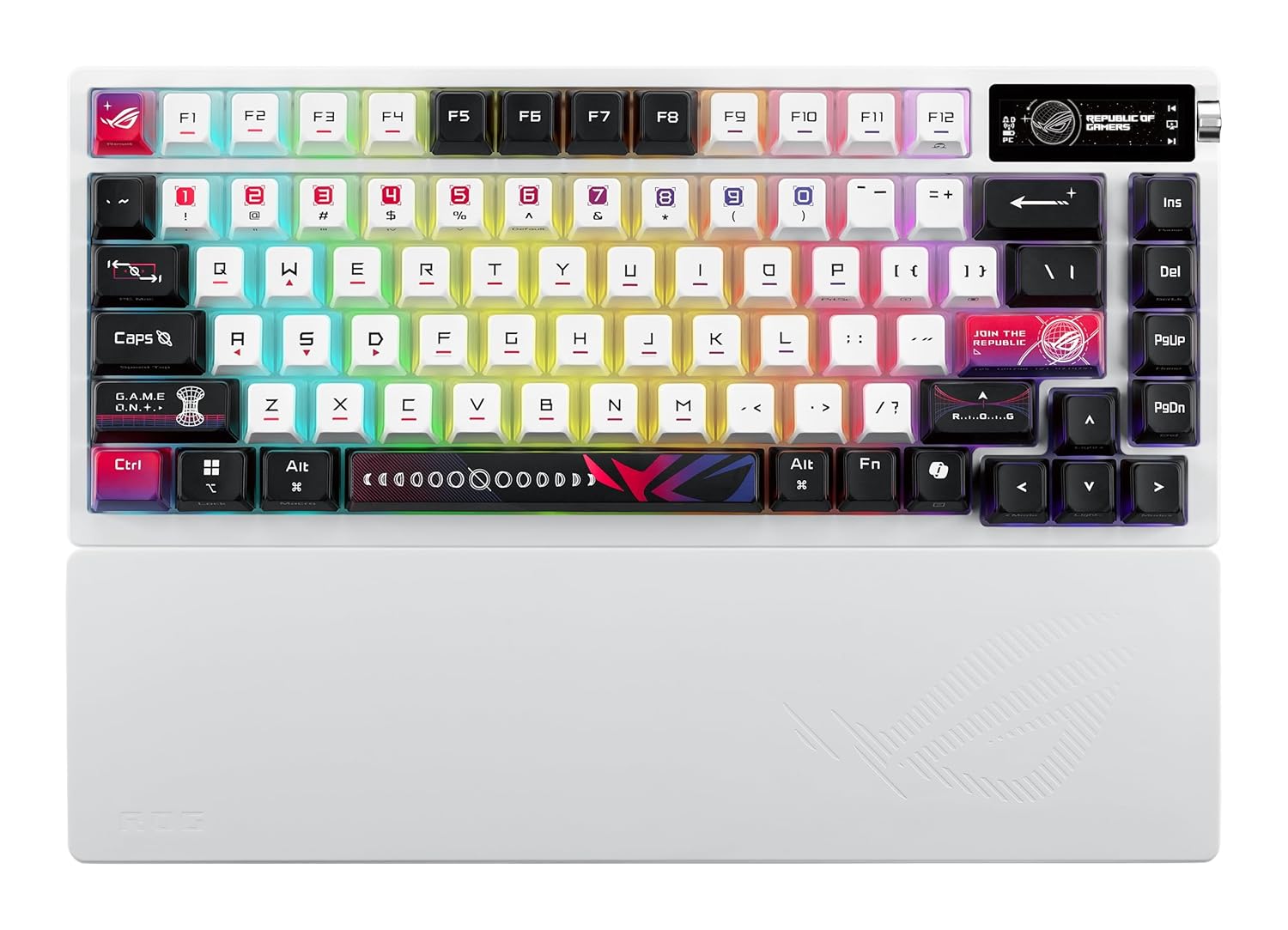
The Asus ROG Azoth X is an absolute masterpiece. It is built specifically for people who obsess over keyboard sounds. It has a full aluminum chassis and a carbon fiber plate inside. There is zero flex. It is heavy, cold to the touch, and feels incredibly expensive. The sound is deeply satisfying. Enthusiasts call it "thocky," and this board delivers that thock perfectly right out of the box.
The craziest part is the OLED touchscreen in the top corner. It shows your battery life, cool little animations, or system temps. You can change settings on the fly with a little control knob.
The battery life is honestly terrifying. If you turn off the screen and the lights, this thing runs for 1600 hours on a single charge. You could easily go months without plugging it in. With the factory lubricated switches, this is the ultimate luxury gaming experience.
Key Highlights
- Full aluminum chassis + carbon fiber plate → premium, heavy, zero flex build.
- Insane acoustics → deep, satisfying 'thocky' sound out of the box.
- Integrated OLED touchscreen → check battery, temps, and animations.
- Terrifyingly good battery life → up to 1600 hours on a single charge.
- Factory lubricated switches → silky smooth typing experience.
Razer BlackWidow V4 Pro 75 Percent
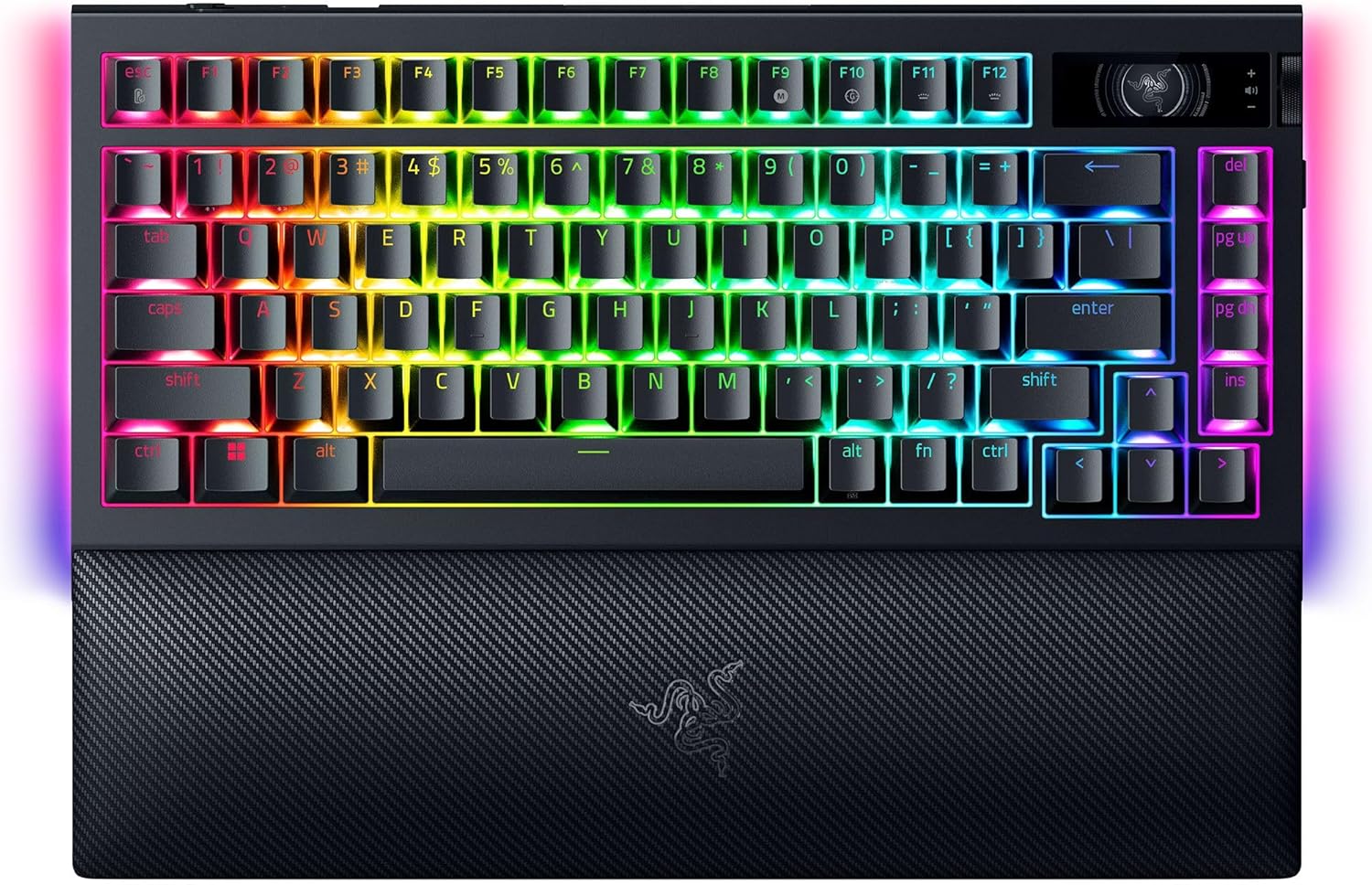
Razer finally stepped up and built a keyboard that custom keyboard snobs actually respect. The BlackWidow V4 Pro 75 Percent is gorgeous. It comes with Razer Orange tactile switches that have a perfectly quiet, satisfying bump. It is amazing for streaming because it will not get picked up by your microphone.
Razer also nailed the wireless speed. It has a true 4000 Hz polling rate. It talks to your computer four times faster than a normal keyboard. You will never feel an ounce of wireless lag. It also features a dedicated OLED screen and a really sleek volume dial.
If you use their new power saving mode, you can squeeze out an unbelievable 2100 hours of battery life. They even included high quality PBT keycaps so the keys will never get that gross, shiny look over time.
Key Highlights
- 4000 Hz polling rate → ultra-fast wireless connection with zero lag.
- Razer Orange tactile switches → quiet, satisfying bump perfect for streaming.
- Unbelievable 2100 hours battery life → when using the power saving mode.
- Dedicated OLED screen + volume dial → easy control at your fingertips.
- High quality PBT keycaps → immune to getting oily or shiny over time.
SteelSeries Apex Pro TKL Gen 3
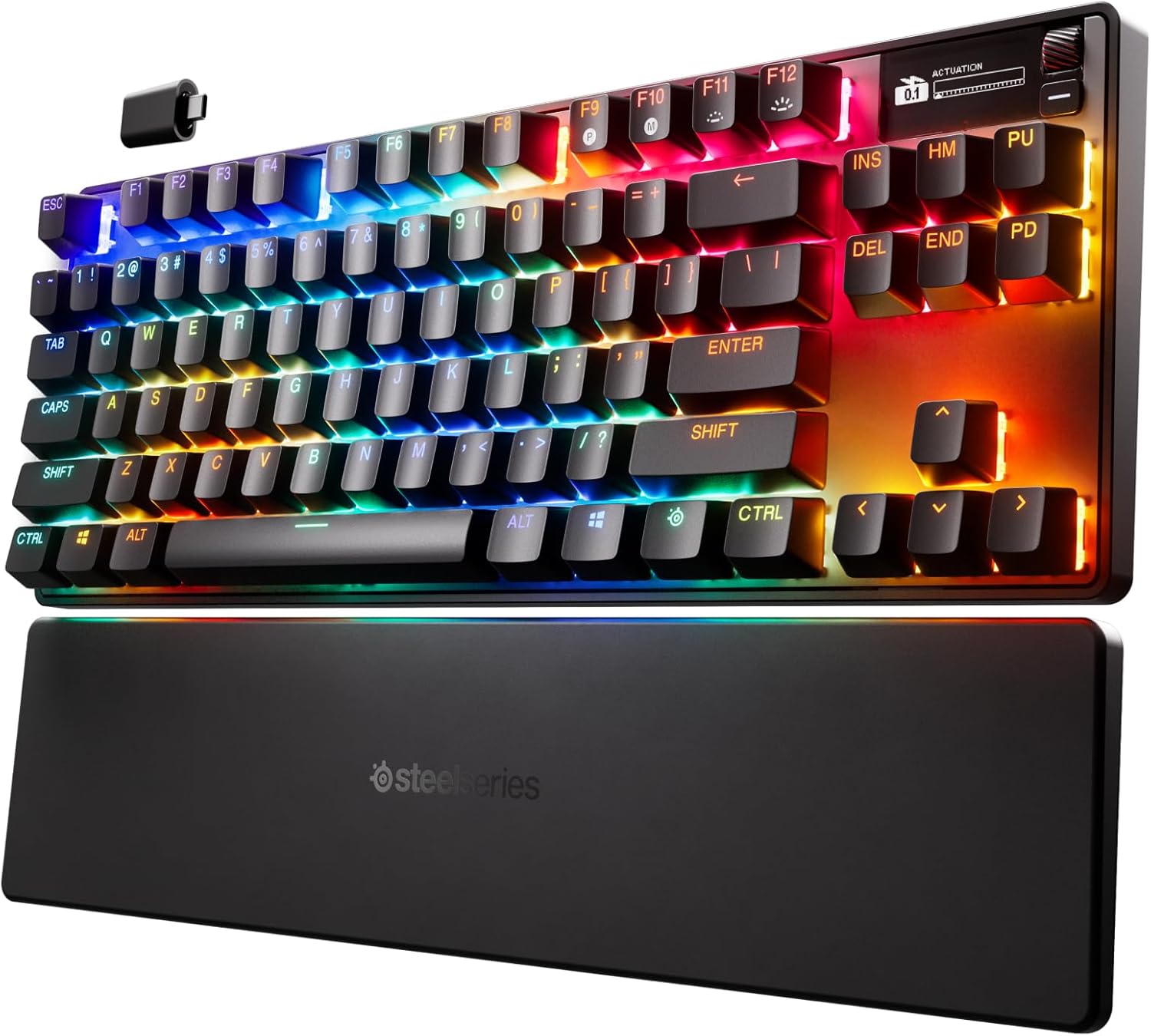
If you do not care about aesthetics and just want raw, unfair competitive speed, buy the Apex Pro TKL Gen 3. This is the king of Hall Effect keyboards.
You can customize the actuation point of every single key across forty different levels. It is eleven times faster than a standard mechanical keyboard. It fully supports Rapid Trigger and all those controversial movement features I mentioned earlier. If you want to absolutely dance around your enemies in shooters, this is the hardware you need. The battery life is only about 45 hours, but the sheer performance advantage makes it entirely worth it.
Key Highlights
- Hall Effect magnetic switches → fully adjustable actuation point.
- Rapid Trigger support → reset keys the instant you lift your finger.
- Snap Tap / Speed Tap ready → perfectly automate stopping in tactical shooters.
- 11x faster than standard mechanical keyboards → brutal competitive advantage.
- Trade-offs: Lower battery life (~45 hours).
The Low Profile Aesthetic
A lot of people hate tall, chunky keyboards. Low profile boards are incredibly thin, have much shorter keys, and look incredibly sleek on a clean desk. They also sit lower, which is way better for your wrists.
Logitech G915 X TKL
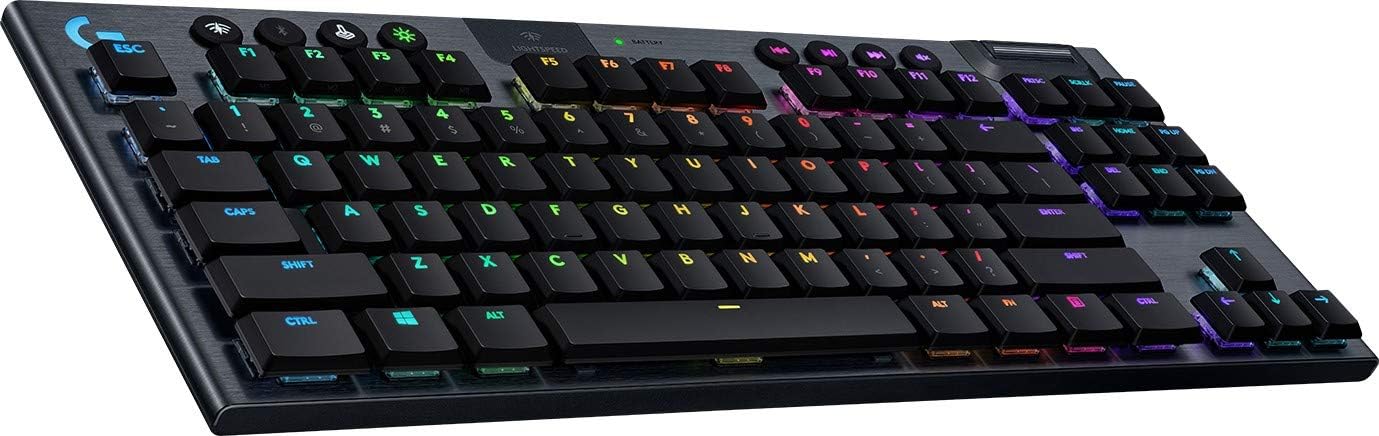
The Logitech G915 X TKL uses standard mechanical low profile switches, but it completely wins on convenience. It has dedicated media buttons and a gorgeous metal volume roller that you will use every single day. Logitech also finally upgraded to premium PBT keycaps, so they stay looking matte and clean forever. If you want better keycaps and media controls, the Logitech is the winner.
Key Highlights
- Premium low-profile mechanical switches → great for gamers and fast typists.
- Dedicated media controls + metal volume roller → unparalleled convenience.
- High-quality PBT keycaps → resists shine and oil buildup.
- Ultra-thin aluminum slab design → sleek and ergonomic.
- Multiple connectivity options -> fast wireless, Bluetooth, and wired.
Corsair K100 Air Wireless
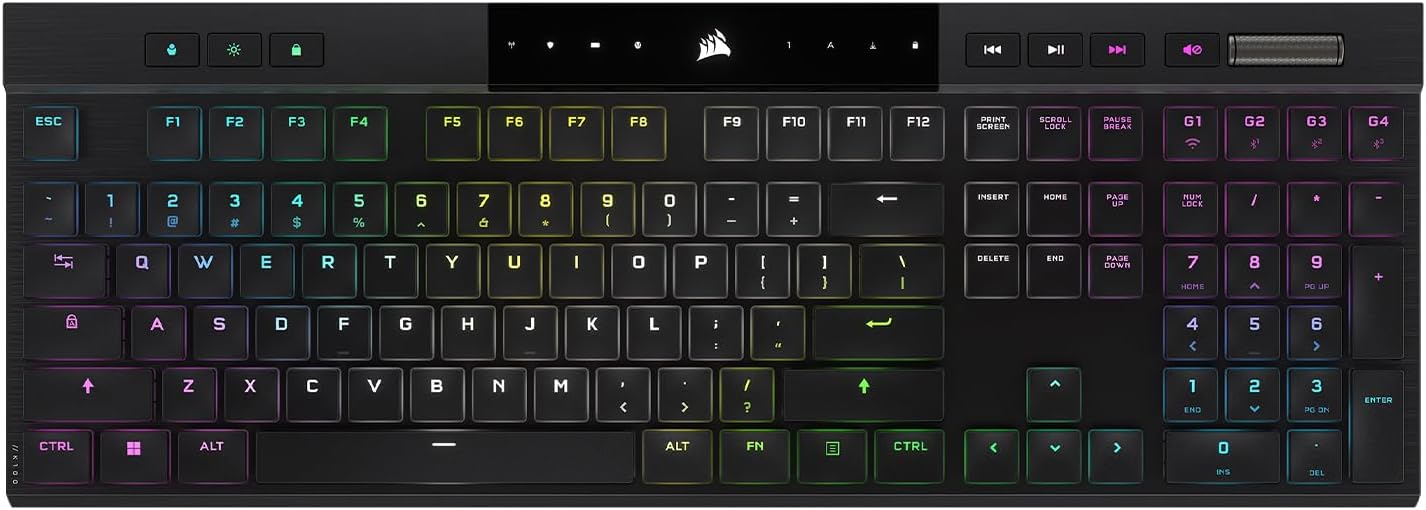
I still have no idea how Corsair engineered this thing. The K100 Air is only 11 millimeters thick. It is absurdly thin. It uses these crazy butterfly switches from Cherry that feel just like a premium laptop keyboard but with a real mechanical bump.
It connects to basically anything seamlessly. You can swap between your gaming PC, your work laptop, and your tablet with a single button. The battery lasts around 50 hours with the lights on, or 200 hours if you turn them off. It is the perfect stealth gaming keyboard for a professional office setup.
Key Highlights
- Insanely thin 11mm profile → the ultimate stealth setup.
- Cherry butterfly tactile switches → feels like a premium laptop keyboard.
- Seamless multi-device switching → perfect for work and gaming dual setups.
- Up to 200 hours battery life → extremely power efficient without RGB.
- Full-size layout in a hyper-compact frame → elegant office aesthetic.
Budget Kings That Actually Rule
You absolutely do not need to spend 250 dollars to get a great keyboard anymore. The mid range market has gotten insanely good lately.
Asus ROG Strix Scope II 96 Wireless
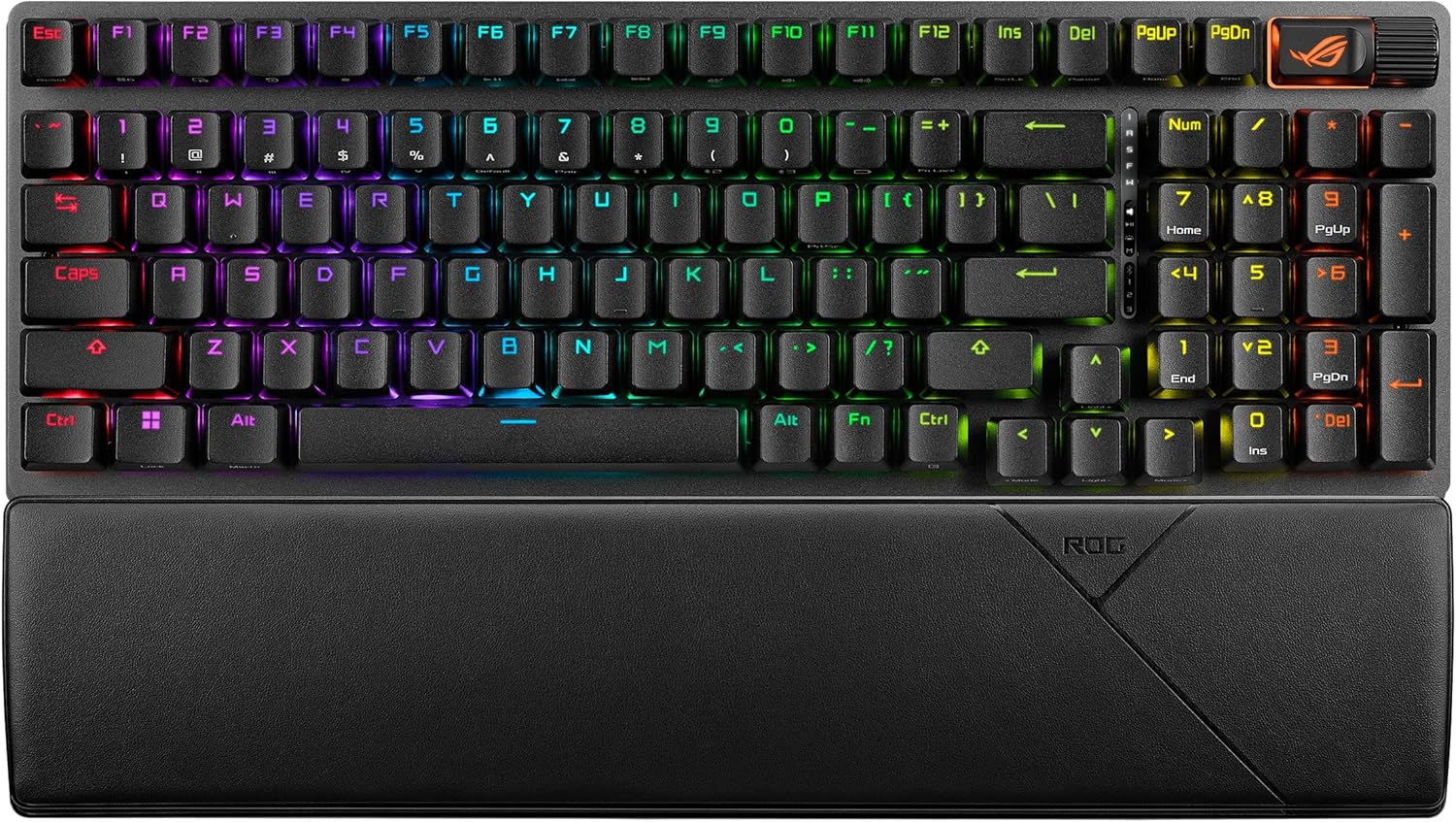
This is the sweet spot of the entire keyboard market. Asus took the 96 percent layout and perfected it. You get your precious number pad, but the keyboard takes up barely any space. It feels incredibly sturdy with an aluminum top plate and thick sound dampening foam inside.
The power efficiency is wild. You get 1500 hours of battery life with the lights off. Even with the RGB blasting at full brightness, you still get 90 hours. It is priced way below the flagship models, but it gives you almost all the same premium features. It is a ridiculously smart purchase.
Key Highlights
- 96% layout → brings the numpad back while saving massive desk space.
- Incredible 1500h battery life → goes months without charging.
- Pre-lubed switches & sound dampening foam → feels sturdy and sounds fantastic.
- Tri-mode connectivity → fast 2.4GHz wireless, Bluetooth, and wired.
- Incredible value → premium enthusiast features at a mid-range price.
Aula F75 Gasket Mechanical Keyboard
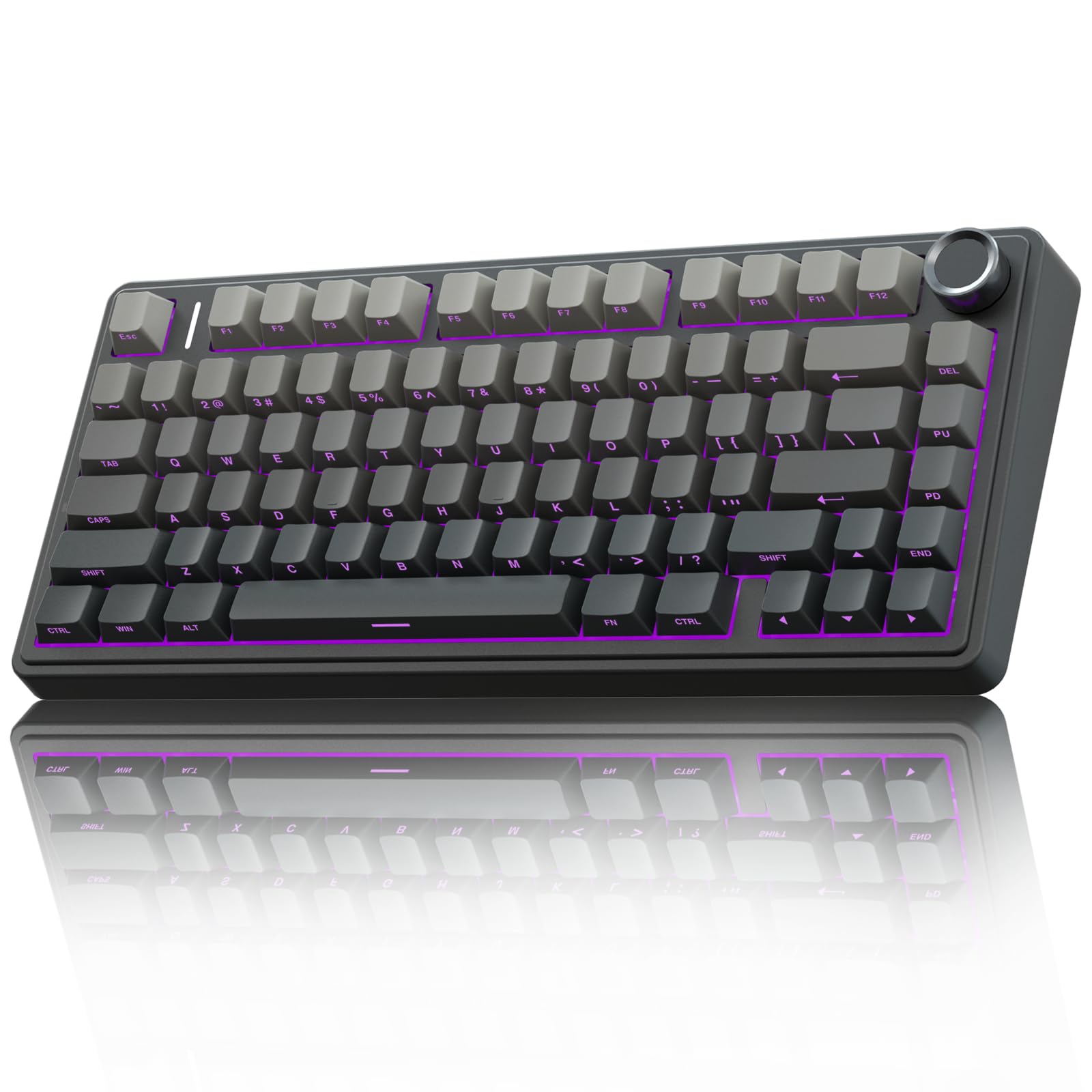
This keyboard makes zero sense. It usually costs well under a hundred dollars, yet it sounds and feels better than keyboards that cost triple the price. It is the undisputed budget king right now.
It uses a gasket mount design, which means the circuit board sits on little rubber cushions. Typing on it feels bouncy and soft. It never hurts your fingers. It also has five layers of sound foam inside. Out of the box, it produces a deep, creamy sound that usually takes custom keyboard builders hours of modding to achieve. It has a volume knob, good battery life, and solid wireless connections. If you are on a budget, just buy this immediately.
Key Highlights
- Undisputed Budget King → enthusiast-grade features for under $100.
- Gasket mount design → soft, bouncy, and comfortable typing feel.
- 5 layers of foam inside → deep, creamy custom keyboard acoustics.
- Built-in volume knob → easy media controls on a budget.
- 75% layout → perfect mix of productivity keys and mouse space.
A Deeper Look into Keyboard Basics
To really get why these premium boards cost what they do, you need to understand the hardware. Traditional cheap keyboards use a giant sheet of rubber domes underneath the keys. You have to smash your finger all the way down to make the computer register a press. It feels spongy, it exhausts your hands, and it completely ruins your reaction time in fast games.
Mechanical keyboards are a whole different beast. Every single key has its own dedicated physical switch. You get distinct feedback, insane durability, and lightning fast response times. You do not even have to press the key all the way down. They activate halfway through your press. That alone makes your movement feel impossibly light and snappy.
Picking Your Poison with Switch Types
The switch you choose completely dictates how your keyboard feels and sounds. Getting this wrong is the biggest mistake first time buyers make.
- Linear Switches: These are the holy grail for sweaty competitive gamers. There is no bump and no click. The key just drops straight down like butter. Because there is zero physical resistance, you can spam keys ridiculously fast. Look for factory lubricated linears if you want that ultra premium, smooth feel.
- Tactile Switches: These are for the normal people. Tactiles give you a highly satisfying little physical bump right when the key registers. You feel the input without bottoming out. If you write code or type essays during the day and game at night, tactiles are absolute perfection.
- Clicky Switches: Look, I will just say it. Clicky switches are obnoxious. They have a physical mechanism inside that makes a loud, high pitched click every single time you press a key. Your Discord teammates will hate you.
- Optical Switches: Instead of two pieces of metal touching, they use a tiny laser beam inside the switch. Break the beam, register the input. They are technically faster and basically last forever.
The Absolute Magic of Hall Effect Switches
If you want the newest, most unfair advantage in gaming, you need a Hall Effect keyboard. Instead of physical contacts or lasers, these switches use actual magnets. As you press the key down, a sensor measures exactly how close the magnet is getting in real time. This means you can completely change the actuation point of every single key.
Hall Effect also gives you Rapid Trigger. Normally, you have to let a key travel back up a bit before you can press it again. Rapid Trigger resets the key the exact millisecond you start lifting your finger.
The Snap Tap Drama
Hall Effect sensors led to a new software feature called Simultaneous Opposite Cardinal Directions resolution. Brands call it Snap Tap or Speed Tap.
In tactical shooters like Counter Strike 2, you have to completely stop moving to shoot accurately. Snap Tap essentially automates this. If you hold left and then press right, the keyboard instantly cancels the left input and stops you dead in your tracks. Half the community thinks it is a genius hardware innovation. The other half thinks it is literal cheating. For casual gaming though, it is an absolute blast to use.
Stop Buying Massive Keyboards
Your keyboard layout matters just as much as your switches. Most people default to buying a massive full size keyboard out of habit.
A giant keyboard forces you to keep your mouse hand pushed way out to the right. It ruins your shoulder posture and leaves you with zero desk space for big mouse swipes.
| Layout Type | Key Percentage | Who Should Actually Buy This |
|---|---|---|
| Full Size | 100% | Accountants and people who desperately need a number pad. |
| Compact Full Size | 96% | Productivity workers who want a number pad but hate wasted desk space. |
| Tenkeyless | 80% | Standard gamers. No number pad, just the essentials. |
| Compact TKL | 75% | The current enthusiast favorite. Everything is tightly packed. |
| Mini Compact | 65% | Minimalists who want arrow keys and nothing else. |
| Ultra Compact | 60% | Hardcore shooter players who need massive mouse space. |
The defining trend right now is the 75 percent layout. It gives you the function row and the arrow keys, but squishes everything into a beautifully tight rectangle.
The Nightmare of Console Compatibility
The PlayStation 5 Situation
Sony actually did a decent job here. The PS5 natively recognizes most modern keyboards. Connect via the 2.4 GHz wireless USB dongle. Bluetooth lag will get you killed in competitive games.
The catch: The front USB ports on the PS5 have a really strict power limit. A bright OLED keyboard might randomly disconnect or flicker. You have to turn the brightness down or plug it into the back of the console to fix this. Also, none of the PC customization software works on the PlayStation. You have to plug the keyboard into a PC first to save the profile.
Microsoft and the Xbox Headache
Microsoft makes using a keyboard incredibly annoying. Do not even try pairing a normal wireless keyboard directly to the console via Bluetooth. It simply will not work. You absolutely must use the 2.4 GHz USB receiver.
Even worse, you cannot even navigate the main Xbox menu with a keyboard. You still have to keep a controller turned on just to launch your games. Plus, you really have to check if your specific game supports keyboard movement.
Care & Maintenance
Stop Ruining Your Gear
A good mechanical keyboard will easily last you ten to fifteen years if you do not treat it like a garbage can. Stop eating chips over your desk.
Every few months, pull the keycaps off. Use compressed air to blow out the crumbs. Take a cotton swab dipped in rubbing alcohol and gently clean between the switches. Soak the keycaps in warm soapy water, scrub them, and let them dry completely. Never pour water directly on the keyboard. Always look for double shot PBT keycaps if you want your setup to stay looking fresh.
Save Your Wrists
Mechanical keyboards sit high off the desk. Hovering your hands at a weird upward angle for six hours is a guaranteed ticket to wrist pain. Do yourself a massive favor and buy a proper wrist rest. Throw a massive desk mat underneath everything to cushion your keyboard and give your mouse a perfect glide surface.
Best 60% Mechanical Keyboards Under $50 for Valorant & CS2 Players (2026 Guide)
If you're into tactical shooters like Valorant or CS2, you know how much the right keyboard matters. Here are the best budget 60% keyboards under $50 with Hall Effect magnetic switches and rapid trigger.
Best Budget Low Profile Mechanical Keyboards in 2026
Looking for a slim, ergonomic, and affordable mechanical keyboard? Check out our top picks for the best budget low-profile boards in 2026.
The Bottom Line
There are absolutely no excuses left to use bad peripherals. Whether you want the competitive cheat code of the SteelSeries Apex Pro, the luxury thock of the Asus Azoth X, or the crazy value of the Aula F75, the perfect wireless board exists for you right now.
Stop settling for laggy inputs and terrible typing acoustics. Upgrade your desk space. Grab one of the boards through the Amazon links above, clean up those messy cables, and finally experience what modern gaming hardware is supposed to feel like.
Frequently Asked Questions (FAQ)
What is the big deal with Hall Effect keyboards?
They use magnets instead of metal contacts. This means you can change exactly how deep you have to press a key to make it work. It also lets the key reset the instant you lift your finger, making your movements in games incredibly fast and snappy. It is the biggest advantage you can buy right now.
Can I just plug a wireless keyboard into my PS5?
Mostly, yes. Use the USB dongle for the best connection. Just know that the PS5 has weak USB ports on the front, so a power hungry keyboard might need to be plugged into the back. Also, none of your PC software will work, so set your colors and macros on a computer first.
Why is everyone obsessed with 75 percent keyboards?
Because number pads are basically useless for gaming. A 75 percent board chops off the right side, bringing your mouse hand closer to your keyboard hand. It is way better for your posture and gives you tons of room to swing your mouse around in shooter games.
Is this Snap Tap thing actually cheating?
It is a massive gray area. It basically plays the hardest part of tactical shooters for you by automating your stops. A lot of pros hate it, and some games will kick you for using it in ranked modes. Use it at your own risk.
How do I clean my keyboard without destroying it?
Pull the keycaps off and wash them in soapy water. Blow the keyboard out with compressed air. Use a Q tip with a little rubbing alcohol to clean between the switches. Never, ever use water on the actual keyboard circuitry.
Disclosure: The links in this post are affiliate links. This means if you click on them and make a purchase, we may earn a small commission at no extra cost to you. As an Amazon Associate, We earn from qualifying purchases.
You May Also Like
Best Budget Hall Effect Keyboards in 2026 (Under $50)
Discover the best budget Hall Effect keyboards under fifty dollars in 2026. Read our honest, in depth analysis of performance, build quality, and software features of the top six magnetic switch boards.
Best Gaming Laptops at Every Budget $900 to $3000 for 2026 Guide
Buying a gaming laptop in 2026 is an absolute minefield. We review the six absolute best gaming laptops from Acer, Lenovo, Alienware, ASUS, and MSI spanning budget to enthusiast tiers.
Best PC Games for 8GB RAM in 2026 (Low Spec PCs)
Is 8GB of RAM enough for gaming in 2026? Discover the best PC games that run smoothly on 8GB RAM rigs, from indie masterpieces to optimized AAA titles and competitive shooters.